
Checkout URL
Our Checkout solution allows a merchant to generate a secure payment link to collect payments from customers via various channels (Mobile Money, Card, Bank). This provides a seamless, hosted payment page experience where the customer completes the transaction.
Note: Currency and channel availability depends on your business account permissions. Contact support to enable additional options.
How it works
The Checkout flow is simple and allows you to securely accept payments without building your own payment UI. Here is the typical journey:
- Initiation: Send a
POSTrequest to generate a Checkout URL. - Redirection: Redirect your customer to the generated
checkout_url. - Payment: The customer chooses their preferred payment channel (e.g., Mobile Money) and completes the payment on the hosted page.
- Verification: Once the payment is completed, OGateway processes it and sends a Webhook to your
callbackURLconfirming the success or failure.
Base URL
https://api.ogateway.ioAuthentication
All requests must include your API key in the Authorization header:
Authorization: your_api_keyGenerate Checkout URL
Generate a secure unique link to collect payment from a customer.
Endpoint: POST /collections/checkout
Body Parameters
| Parameter | Type | Required | Description |
|---|---|---|---|
| amount | number | Yes | The amount to charge (e.g., 100.50). |
| currency | string | Yes | The currency code. See Currency codes |
| callbackURL | string | No | The URL for the final transaction status webhook. This overrides the default callback URL saved under your business. |
| channels | array of string | No | Specific payment channels to enable for this checkout session (e.g., ["MOMO", "CARD", "BANK"]). If omitted, all enabled channels for the currency will be shown. |
Example Request
curl --request POST \
  --url https://api.ogateway.io/collections/checkout \
  --header 'Authorization: your_api_key' \
  --header 'Content-Type: application/json' \
  --data '{
    "amount": 100.50,
    "currency": "GHS",
    "callbackURL": "https://your-website.com/webhook",
    "channels": ["MOMO", "CARD"]
  }'
Example Response (200 OK)
The response contains the id of the checkout session and the checkout_url to redirect your customer to.
{
  "id": "32771d91-a45b-4fc9-b6f4-fc299efce9ec",
  "checkout_url": "https://ogateway.io/checkout/khePqkknRMeN"
}
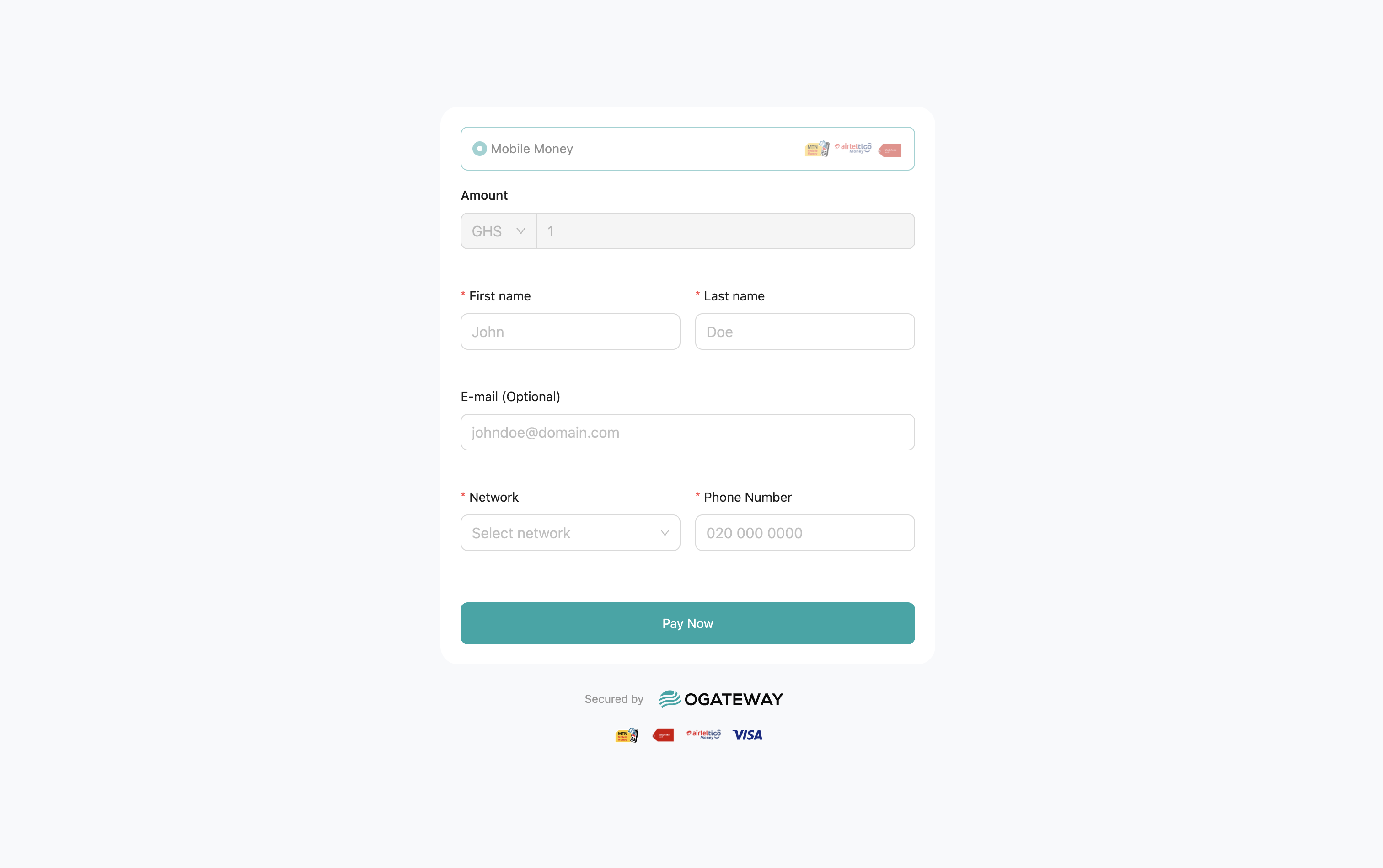
Here, when you click on the checkout url, it shows you a page like this:
See Error Codes for Error Responses.
Handling the Callback
See full details in our Callbacks section
Since Checkout transactions depend on the customer completing the payment on the hosted page, you should listen for a Webhook event at the callbackURL you provided to confirm the final status.
Success Payload Example
{
  "id": "32771d91-a45b-4fc9-b6f4-fc299efce9ec",
  "amount": "100.50",
  "fee": "1.50",
  "currency": "GHS",
  "status": "COMPLETED",
  "channel": "MOMO",
  "type": "DEBIT",
  "reason": "Checkout",
  "network": "MTN",
  "bear_fee": "business",
  "customer": {
    "accountName": "John Doe",
    "accountNumber": "0249123456"
  },
  "metadata": {},
  "created_at": "2023-07-06T13:35:41.308Z",
  "updated_at": "2023-07-06T13:38:46.308Z",
  "checkout_url": "https://ogateway.io/checkout/khePqkknRMeN",
  "message": "0000 | Switch | Approved",
  "telco_response": "APPROVED",
  "virtual_account": null,
  "provider_message": "Success",
  "reference_business": "checkout_1718272547612",
  "instructions": null
}
Failed Payload Example
{
  "id": "32771d91-a45b-4fc9-b6f4-fc299efce9ec",
  "amount": "100.50",
  "fee": "0",
  "currency": "GHS",
  "status": "FAILED",
  "channel": "MOMO",
  "type": "DEBIT",
  "reason": "Checkout",
  "network": "MTN",
  "bear_fee": "business",
  "customer": {
    "accountName": "John Doe",
    "accountNumber": "0249123456"
  },
  "metadata": {},
  "created_at": "2023-07-06T13:35:41.308Z",
  "updated_at": "2023-07-06T13:40:41.308Z",
  "checkout_url": "https://ogateway.io/checkout/khePqkknRMeN",
  "message": "4200 | Customer | Customer failed to 1. Respond to the prompt on time or 2. Enter the correct pin",
  "telco_response": "Request timeout",
  "virtual_account": null,
  "provider_message": "Failed",
  "reference_business": "checkout_1718272547612",
  "instructions": null
}
Best Practices
-
Webhook Security: Verify webhook signatures to ensure callbacks originate from OGateway. See our Callback / Webhook Security guide for implementation details.
-
Idempotency: Use the Checkout session
idto query the status if you do not receive a webhook in a reasonable time, before assuming failure. -
Amount Limits: The system enforces minimum and maximum transaction limits based on the currency and channel. Ensure amounts are within limits to avoid rejection.
-
Test Mode: Use test API keys (starting with
test_) during development. Checkout links generated in test mode will direct you to a simulated payment page where you can test success and failure flows without real money.
Updated 21 days ago