
Mobile Money
Our Mobile Money solution allows a merchant to debit customers directly on all major networks across multiple African countries. This is the most popular payment method in the region, offering real-time settlement and high success rates.
Note: Currency and network availability depends on your business account permissions. Contact support to enable additional currencies.
Base URL
https://api.ogateway.ioAuthentication
All requests must include your API key in the Authorization header:
Authorization: your_api_keyHow it works
The payment flow is synchronous for the user but asynchronous for your server. Here is the typical journey:
Standard Flow
- Initiation: Send a
POSTrequest with the customer's mobile money details to trigger the debit. - Prompt: The customer receives a USSD prompt (pop-up) on their mobile device instantly.
- Authorization: The customer enters their Mobile Money PIN to authorize the transaction.
- Verification: OGateway processes the debit and sends a Webhook to your
callbackURLconfirming the success or failure.
OTP Flow (Ghana GHS only)
Endpoint: POST /collections/otp
For transactions on certain networks (e.g., MTN) or when SMS OTP is enabled on your business account:
- Initiation: Send a POST request with the customer's mobile money details.
- OTP Sent: An SMS containing a one-time password (OTP) is sent to the customer's mobile number.
- Submit OTP: Submit the OTP via the
/collections/otpendpoint. - Processing: Once validated, the transaction proceeds to debit the customer.
- Verification: OGateway sends a Webhook to your
callbackURLwith the final status.
Note: The OTP feature is primarily for Ghana (GHS) transactions and may incur an additional SMS fee.
Initiate Collection
Charge a customer's mobile money account directly.
Endpoint: POST /collections/mobilemoney
Collection Sequence Flow
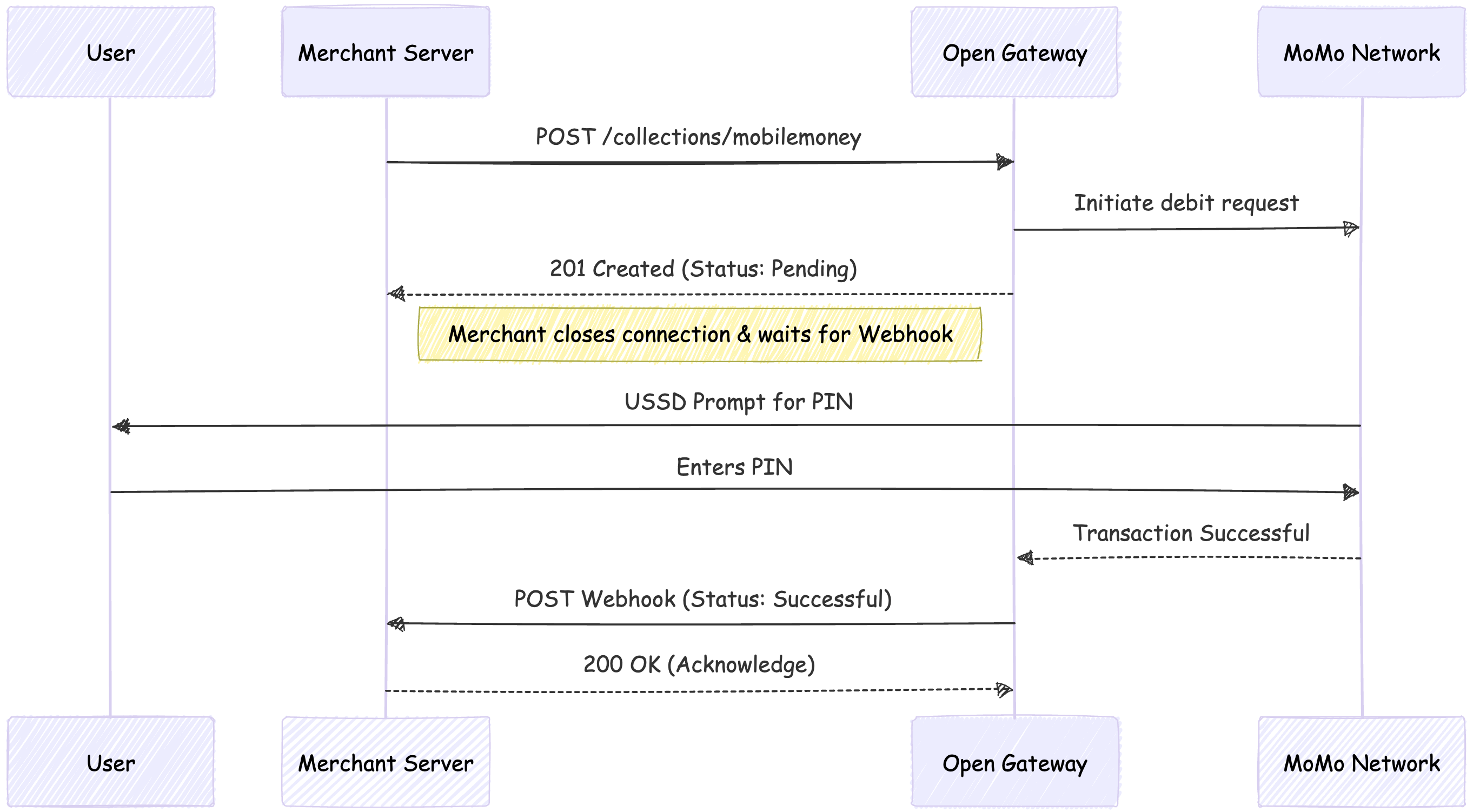
MOMO Collection Flow
Body Parameters
| Parameter | Type | Required | Description |
|---|---|---|---|
| amount | number | Yes | The amount to charge (e.g., 100.50). |
| currency | string | Yes | The currency code. See Currency codes |
| network | string | Yes | The mobile network provider (e.g., MTN, VOD, ATM, ORANGE, MPS_KE). |
| accountName | string | Yes | The name on the mobile money account. |
| accountNumber | string | Yes | The customer's mobile money number (e.g., 0249567265). Phone number will be automatically cleaned and normalized to international format. |
| reason | string | Yes | A description of the transaction. |
| reference | string | Yes | A unique string to identify this transaction in your system. Must be unique - duplicate references will be rejected. |
| callbackURL | string | No | The URL for the final transaction status webhook. This overrides the default callback URL saved under your business. |
| metadata | object | No | Additional data to store with the transaction. |
| string | No | Customer's email address. | |
| paylinkId | string (UUID) | No | ID of an associated paylink if this transaction is part of a payment link flow. |
| channel | string | No | Transaction channel override. |
| merchantName | string | No | Merchant display name for the transaction. |
Example Request
curl --request POST \
  --url https://api.ogateway.io/collections/mobilemoney \
  --header 'Authorization: your_api_key' \
  --header 'Content-Type: application/json' \
  --data '{
    "amount": 22,
    "currency": "GHS",
    "network": "MTN",
    "accountName": "Bernard Danso",
    "accountNumber": "0249567265",
    "reason": "Payment for services",
    "reference": "momo_txn_892302",
    "callbackURL": "https://your-website.com/webhook"
  }'
Example Response (200 OK)
The immediate response shows the transaction has been initiated. The final status will be sent to your webhook.
{
    "id": "919e09a1-b8fd-4406-96c6-89a0a35f3980",
    "amount": 22,
    "fee": 0.035,
    "currency": "GHS",
    "status": "INITIATED",
    "channel": "MOMO",
    "type": "DEBIT",
    "customer": {
        "accountName": "Bernard Danso",
        "accountNumber": "233249567265"
    },
    "metadata": {
        "smsFee": 0
    },
    "reason": "depositt",
    "network": "MTN",
    "checkout_url": null,
    "provider_message": "Pending",
    "reference_business": "1780072819284",
    "created_at": "2026-05-29T16:40:20.336Z",
    "updated_at": "2026-05-29T16:40:20.336Z",
    "virtual_account": null,
    "message": null,
    "telco_response": null,
    "bear_fee": "customer"
}
See Error Codes for Error Responses.
Handling the Callback
See full details in our Callbacks section
Since Mobile Money transactions depend on user input (entering a PIN), you should listen for a Webhook event at the callbackURL you provided to confirm the final status.
Note: The immediate API response may show a status of
PENDINGorCOMPLETEDdepending on how quickly the customer authorizes the payment. Always rely on the webhook for the final status.
Success Payload Example
{
  "id": "5ba941b5-eb5c-4618-b8ec-4d1419fb1111",
  "amount": "22",
  "fee": "0.22",
  "currency": "GHS",
  "status": "COMPLETED",
  "channel": "MOMO",
  "type": "DEBIT",
  "reason": "Payment for services",
  "network": "MTN",
  "bear_fee": "business",
  "customer": {
    "accountName": "Bernard Danso",
    "accountNumber": "0249123456"
  },
  "metadata": {
    "transactionAmount": 132, //for payouts
    "smsFee": 0 //for collections
  },
  "created_at": "2023-07-06T13:35:41.308Z",
  "updated_at": "2023-07-06T13:35:46.308Z",
  "checkout_url": null,
  "message": "0000 | Switch | Approved",
  "telco_response": "APPROVED",
  "virtual_account": null,
  "provider_message": "Success",
  "reference_business": "d20d4d8df15712345432"
}
Failed Payload Example
{
  "id": "5ba941b5-eb5c-4618-b8ec-4d1419fb2d38",
  "amount": "22",
  "fee": "0",
  "currency": "GHS",
  "status": "FAILED",
  "channel": "MOMO",
  "type": "DEBIT",
  "reason": "Payment for services",
  "network": "MTN",
  "bear_fee": "business",
  "customer": {
    "accountName": "Bernard Danso",
    "accountNumber": "0249123456"
  },
  "metadata": {
    "transactionAmount": 132, //for payouts
    "smsFee": 0 //for collections
  },
  "created_at": "2023-07-06T13:35:41.308Z",
  "updated_at": "2023-07-06T13:40:41.308Z",
  "checkout_url": null,
  "instructions": "If no prompt pops up, pls check your Approval List by dialing *170# and choosing option 6 then option 3.", // for collections
  "message": "4200 | Customer | Customer failed to 1. Respond to the prompt on time or 2. Enter the correct pin",
  "telco_response": "Request timeout",
  "virtual_account": null,
  "provider_message": "Failed",
  "reference_business": "d20d4d8df15712345432"
}
Best Practices
-
Unique References: Always use a unique
referencefor each transaction. The system automatically prevents duplicate transactions and references to protect against accidental double-charging. -
Phone Number Format: You can provide phone numbers in any format (local or international). The system automatically cleans and normalizes them to international format (e.g.,
0249567265becomes+233249567265). -
Webhook Security: Verify webhook signatures to ensure callbacks originate from OGateway. See our Callback / Webhook Security guide for implementation details.
-
Idempotency: If you don't receive a webhook within a reasonable timeframe (e.g., 5 minutes), query the transaction status using the transaction
idrather than retrying the charge. -
Error Handling: Always check the
messagefield in failed webhooks and compare against the Error Codes to understand why a transaction failed and provide appropriate feedback to your customers. -
Amount Limits: The system enforces minimum and maximum transaction limits based on the provider and currency. Ensure your amounts fall within these limits to avoid rejection.
-
Amount Precision: Ensure amounts are sent as numbers with appropriate decimal precision for the currency (e.g., 2 decimal places for GHS).
-
OTP Handling: If your business has SMS OTP enabled for GHS transactions, inform customers they will receive an OTP via SMS. Handle the OTP submission flow in your application.
-
Test Mode: Use test API keys (starting with
test_) during development. Test transactions will return simulated responses without charging real accounts. -
Customer Experience:
- For standard flow: Inform customers they will receive a USSD prompt and should enter their PIN promptly.
- For OTP flow: Inform customers they will receive an SMS with a verification code.
Common Error Scenarios
- Duplicate Reference: Using the same
referencetwice will result in an error. Ensure each transaction has a unique reference. - Insufficient Balance: Customer's mobile money account doesn't have enough funds.
- Transaction Limits: Amount exceeds customer's transaction limit or account limit.
- Invalid Network: Network code doesn't match the phone number prefix.
- Account Not Found: Mobile money account number is invalid or doesn't exist.
- Currency Not Enabled: Your business account doesn't have permission for the requested currency.
- Business Pending: Your business account is still pending verification and can only process test transactions.
Updated 5 months ago